
This section contains carefully selected MCQs and Previous Year Questions with explanations to help students understand concepts and prepare effectively for examinations, interviews, and competitive tests.
Q: 1Which method actually starts a new thread of execution?
Option B
In Java, a thread is a separate path of execution that allows a program to perform multiple tasks concurrently. The Thread class provides two important methods related to starting a thread, start() and run().
The start() method actually starts a new thread of execution. When start() is called, the JVM creates a new thread and then invokes the run() method on that new thread.
E.g.:
class TestExample extends Thread
{
public void run()
{
System.out.println("Thread is running");
}
public static void main(String args[])
{
TestExample obj = new TestExample();
obj.start();
}
}
OUTPUT
Thread is running
Here, run() contains the task that the new thread should perform, while start() is responsible for starting the new thread.
An important point is that calling run() directly does not create a new thread. For example, the statement obj.run(); simply executes the run() method like a normal method call in the current thread.
Q: 2Which interface is used to create a thread in Java?
Option B
In Java, a thread represents an independent path of execution. One common way to create a thread is by implementing the Runnable interface, which belongs to the java.lang package.
The Runnable interface contains a single important method, run(). We place the code that should execute in a separate thread inside this method. Then, an object of the class implementing Runnable is passed to a Thread object, and calling start() begins the new thread.
E.g.:
class Example implements Runnable
{
public void run()
{
System.out.println("Thread is Running");
}
public static void main(String args[])
{
Example obj = new Example();
Thread t = new Thread(obj);
t.start();
}
}
OUTPUT
Thread is Running
Q: 3What happens when run() is called directly on a Thread object?
Option B
In Java, the run() method contains the code that a thread is supposed to execute. However, calling run() directly does not start a new thread. It behaves like an ordinary method call, so its statements execute in the current thread.
E.g.:
class TestExample extends Thread
{
public void run()
{
System.out.println("The run() method is Executing");
}
public static void main(String args[])
{
TestExample obj = new TestExample();
obj.run();
}
}
OUTPUT
The run() method is Executing
Here, obj.run() is called directly. Therefore, no new thread is created. The run() method simply executes as a normal method inside the thread that is already running the main() method.
Q: 4Which cannot directly cause a thread to stop executing?
Option D
In Java, a thread can temporarily stop executing or enter a waiting state for several reasons, such as waiting for another thread, waiting for input, or waiting to acquire a lock.
The wait() method causes the current thread to release the monitor of the object and wait until it is notified, interrupted, or the specified waiting time expires.
In contrast, notify() does not stop the calling thread; it wakes one thread that is waiting on the same object monitor, allowing that thread to compete to resume execution.
Q: 5Which statement about sleep() is correct?
Option B
In Java, the sleep() method is used to pause the currently executing thread for a specified amount of time. During this period, the thread does not continue executing its normal code. After the specified time has elapsed, the thread becomes eligible to continue execution, subject to normal thread scheduling.
An important point is that sleep() does not release any intrinsic monitor locks held by the thread. This is the main difference between sleep() and wait().
Q: 6Which method releases the monitor lock held by the current thread and waits?
Option A
In Java, the wait() method is used for inter-thread communication. When a thread calls wait() while it owns an object's monitor lock, the thread releases that monitor lock and enters a waiting state. This allows another thread to acquire the same lock and perform its work.
The wait() method is defined in the Object class, so every Java object can be used for this type of synchronization.
Q: 7Which is incorrect in case of threads in Java?
Option C
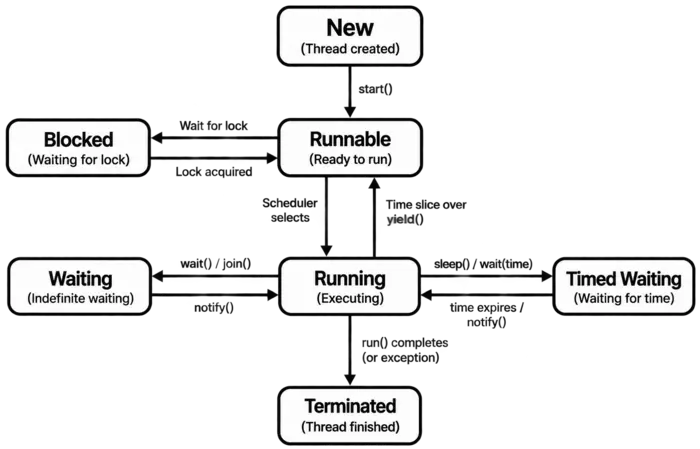
A thread in Java is a lightweight unit of execution within a program. A Java program can have multiple threads running independently or concurrently. During its life cycle, a thread can move through different states such as NEW, RUNNABLE, BLOCKED, WAITING, and TERMINATED.
A thread can be temporarily blocked, for example, when it is waiting to acquire a lock held by another thread.
The older Java API also provided the stop() method to terminate a thread. However, Thread.stop() is deprecated because it can terminate a thread in an unsafe state and may leave shared data inconsistent.
Q: 8What is the name of the method used to start a thread execution?
Option B
In Java, the start() method is used to begin the execution of a new thread. When start() is called on a Thread object, Java creates a new thread of execution and then invokes the run() method on that new thread.
The important distinction is that start() creates the new thread, whereas run() contains the task that the thread performs. Calling run() directly does not create a new thread, it executes the method like an ordinary method call in the current thread.
Q: 9Which method causes the current thread to wait for another thread to finish?
Option C
In Java, the join() method is used when one thread needs to wait for another thread to finish its execution. When a thread calls join() on another thread, the calling thread pauses until the specified thread completes.
E.g.:
class TestExample extends Thread
{
public void run()
{
System.out.println("Child Thread is Running");
}
public static void main(String args[]) throws InterruptedException
{
TestExample obj = new TestExample();
obj.start();
obj.join();
System.out.println("Main Thread Continues");
}
}
OUTPUT
Child Thread is Running
Main Thread Continues
Here, obj.start() starts the child thread. When obj.join() is executed, the main thread waits for obj to finish. After the child thread completes, the main thread continues.
| Method Name | Description |
|---|---|
| start() | Starts a new thread and then causes its run() method to execute. |
| run() | Contains the task/code performed by the thread. Calling it directly does not create a new thread. |
| sleep() | Pauses the currently executing thread for a specified time. |
| join() | Makes the current thread wait until another thread finishes. |
| yield() | Gives other runnable threads an opportunity to execute. It is only a scheduling hint to the JVM. |
| isAlive() | Checks whether a thread has been started and has not yet finished. |
| getName() | Returns the name of a thread. |
| setName() | Changes the name of a thread. |
| getPriority() | Returns the thread's priority. |
| setPriority() | Changes the thread's priority within the allowed range. |
| currentThread() | Returns the Thread object representing the currently executing thread. |
| interrupt() | Requests interruption of a thread, typically by setting its interrupt status. |
| isInterrupted() | Checks whether a thread's interrupt status is set. |
| interrupted() | Checks the current thread's interrupt status and clears it if it was set. |
Q: 10What is the default value of priority variable MIN_PRIORITY and MAX_PRIORITY?
Option B
In Java, every thread has a priority, which helps the thread scheduler determine the relative importance of threads. Thread priority is represented by an integer value. Java provides three predefined priority constants in the Thread class:
Therefore, the minimum possible thread priority is 1, while the maximum possible thread priority is 10.
Thread Priority Constants:
| Constant | Value | Description |
|---|---|---|
| Thread.MIN_PRIORITY | 1 | Represents the minimum thread priority. |
| Thread.NORM_PRIORITY | 5 | Represents the normal or default thread priority. |
| Thread.MAX_PRIORITY | 10 | Represents the maximum thread priority. |
E.g.:
class Example
{
public static void main(String args[])
{
Thread t = new Thread();
System.out.println("Minimum Priority: " + Thread.MIN_PRIORITY);
System.out.println("Normal Priority: " + Thread.NORM_PRIORITY);
System.out.println("Maximum Priority: " + Thread.MAX_PRIORITY);
System.out.println("Thread Priority: " + t.getPriority());
}
}
OUTPUT
Minimum Priority: 1
Normal Priority: 5
Maximum Priority: 10
Thread Priority: 5
Thank you so much for taking the time to read my Computer Science MCQs section carefully. Your support and interest mean a lot, and I truly appreciate you being part of this journey. Stay connected for more insights and updates! If you'd like to explore more tutorials and insights, check out my YouTube channel.
Don’t forget to subscribe and stay connected for future updates.
| Student Name | |
|---|---|
| College |
| What's Say |
|---|