
This section contains carefully selected MCQs and Previous Year Questions with explanations to help students understand concepts and prepare effectively for examinations, interviews, and competitive tests.
Q: 1What happens in the following code?
final int x;
x = 20;
System.out.println(x);
Option B
In Java, a final variable can be assigned a value once, but it does not necessarily have to be initialized at the time of declaration. When a final local variable is declared without an initial value and is assigned a value later before its first use, it is called a blank final variable. Therefore, the following code is completely valid.
The important rule is that a final variable can be assigned only once. In the given code, x is declared first and then assigned 20. Since x has not been assigned any value before, this is its first and only assignment, so the compiler accepts the code.
Also, a local final variable does not automatically receive a default value such as 0. It must be assigned before it is used.
E.g.: 1
public class FinalVariableDemo
{
public static void main(String args[])
{
final int x; // Declared but not initialized
x=20; // Assigned for the first and only time
}
}
E.g.: 2
public class FinalVariableDemo
{
public static void main(String args[])
{
final int x;
x=20;
x=30; // Compilation Error
}
}
Q: 2What is the output?
byte b=10;
b=(byte)(b+200);
System.out.println(b);
Option C
In Java, the byte data type is a signed 8-bit integer. Therefore, it can store values only in the range -128 to 127. In the given statement, b is initially assigned the value 10.
In statement b=(byte)(b+200);, an important Java rule is involved, when arithmetic is performed on a byte, the value is automatically promoted to int. Therefore, b+200 is calculated as an int, i.e., 10+200 = 210.
At this stage, the result is 210, which is an int. Since 210 cannot be directly stored in a byte, the explicit cast (byte) is used.
However, 210 is outside the valid byte range of -128 to 127. When an int value is explicitly converted to a byte, Java retains the lowest 8 bits of the value. The resulting 8-bit pattern is interpreted as a signed two's-complement value.
(210)2 = 00000000 00000000 00000000 11010010
The lowest 8 bits: 11010010
Because the leftmost bit is 1, this represents a negative number in signed 8-bit two's-complement representation. Its decimal value is 210-256 = -46.
Therefore, the value stored in b becomes -46, and System.out.println(b); prints -46.
Note:
If the explicit cast (byte) is not present, the statement produces a Compilation Error because Java promotes the byte value to int during arithmetic. Therefore, b+200 has the type int, and Java does not allow an int value to be assigned directly to a byte variable without an explicit narrowing conversion.
E.g.:
class MyDriver
{
public static void main(String[] args)
{
byte b=10;
b=(b+200);
System.out.println(b);
}
}
When we compile the code without the explicit (byte) cast, the compiler generates an error such as “incompatible types: possible lossy conversion from int to byte” at the statement b=(b+200);.
Q: 3Which declaration is valid?
Option C
In Java, numeric literals have specific default data types. A decimal floating-point literal such as 10.5 is treated as a double by default. If we want a decimal literal to be treated as a float, we use the suffix f or F, as in 10.5f. Java allows a float value to be automatically converted to double because double has a larger range and greater precision. Therefore, the declaration double d = 10.5f; is valid.
Option (A): float f = 10.5; [Invalid]
Here, 10.5 is a double literal by default. The variable f is of type float. Java does not automatically convert a double into a float because this conversion can result in loss of precision.
E.g.:
Option (B): long l = 2147483648; [Invalid]
In Java, an integer literal without a suffix such as L is normally treated as an int if its value can be represented by the int data type. The maximum value of an int is 2,147,483,647, whereas 2147483648 is one greater than the maximum int value.
Therefore, the compiler cannot treat 2147483648 as an int literal, and the statement produces a Compilation Error. Although a long variable can store this value, the literal itself must be explicitly written as a long literal using the L suffix.
E.g.:
Here, L tells the compiler that 2147483648 is a long literal, so it can be assigned to the long variable.
Option (D): byte b = 128; [Invalid]
In Java, the byte data type is a signed 8-bit integer and can store values only from -128 to 127. The value 128 is outside this range, so it cannot be directly assigned to a byte variable. Therefore, the following declaration produces a Compilation Error.
E.g.:
The statement byte b = (byte)128; is valid and code will compile, but the value becomes -128 because the conversion from int to byte retains the lower 8 bits of the value and interprets them using signed 2’s-complement representation.
Q: 4Which statement is true regarding local variables?
Option C
In Java, local variables do not receive default values automatically. A local variable must be explicitly assigned a value before it is used, otherwise, the compiler produces a “variable might not have been initialized” error. This rule ensures that a local variable is not used with an undefined value.
E.g.:
public class MyDriver
{
public static void main(String[] args)
{
int x;
System.out.println(x); // Compilation Error
}
}
Here, x is declared but no value is assigned to it before it is used, so the compiler reports an error.
Note:
It is important to distinguish local variables from instance and static variables. Instance and static variables are automatically initialized with default values such as 0 for numeric types, false for boolean, and null for reference types.
In Java, variables can be broadly classified according to where they are declared and how long they exist. The three main types are local variables, instance variables, and static (class) variables.
| Type of Variable | Where Declared | Belongs To | Default Value? |
|---|---|---|---|
| Local Variable | Inside a method, constructor, or block. | Method/Block | No |
| Instance Variable | Inside a class but outside methods / constructors / blocks. | Object | Yes |
| Static Variable | Inside a class with static keyword. | Class | Yes |
E.g.:
public class VariableTypesDemo
{
String name;
static String college = "Suraku Academy";
void display()
{
int marks = 92;
System.out.println("Name : " + name);
System.out.println("College : " + college);
System.out.println("Marks : " + marks);
}
public static void main(String[] args)
{
VariableTypesDemo s1 = new VariableTypesDemo();
s1.name = "Banjara";
VariableTypesDemo s2 = new VariableTypesDemo();
s2.name = "Nirmohi";
System.out.println("Student 1:");
s1.display();
System.out.println("Student 2:");
s2.display();
}
}
OUTPUT
Student 1:
Name : Banjara
College : Suraku Academy
Marks : 92
Student 2:
Name : Nirmohi
College : Suraku Academy
Marks : 92
Q: 5Which of the following is not a valid variable name in Java language?
Option D
Java naming convention is a mechanism to follow as you decide what to name your identifiers such as class, package, variable, constant, method, etc.
Rules For Writing Variable Name:
The variable name rate-of-taxi contains hyphens (-), which Java treats as subtraction operators and it is invalid variable name.
Q: 6What is the output of the following code?
int x = 10;
double y = 3;
System.out.println(x/y);
Option C
In Java, when arithmetic is performed between an int and a double, the int value is automatically promoted to double before the operation.
In the given code, x is 10 and y is 3.0 because y is declared as a double. Therefore, the expression x/y is effectively calculated as 10.0/3.0, which produces the approximately floating-point result 3.3333333333333335. Since the result is a double, Java does not discard the fractional part.
Q: 7Size of “int” data type in Java language is—
Option D
In Java, the size of each primitive data type is fixed, regardless of the operating system or machine architecture. The int data type always occupies 32 bits (4 bytes) of memory. This consistency is a key feature of Java Portability across different platforms.
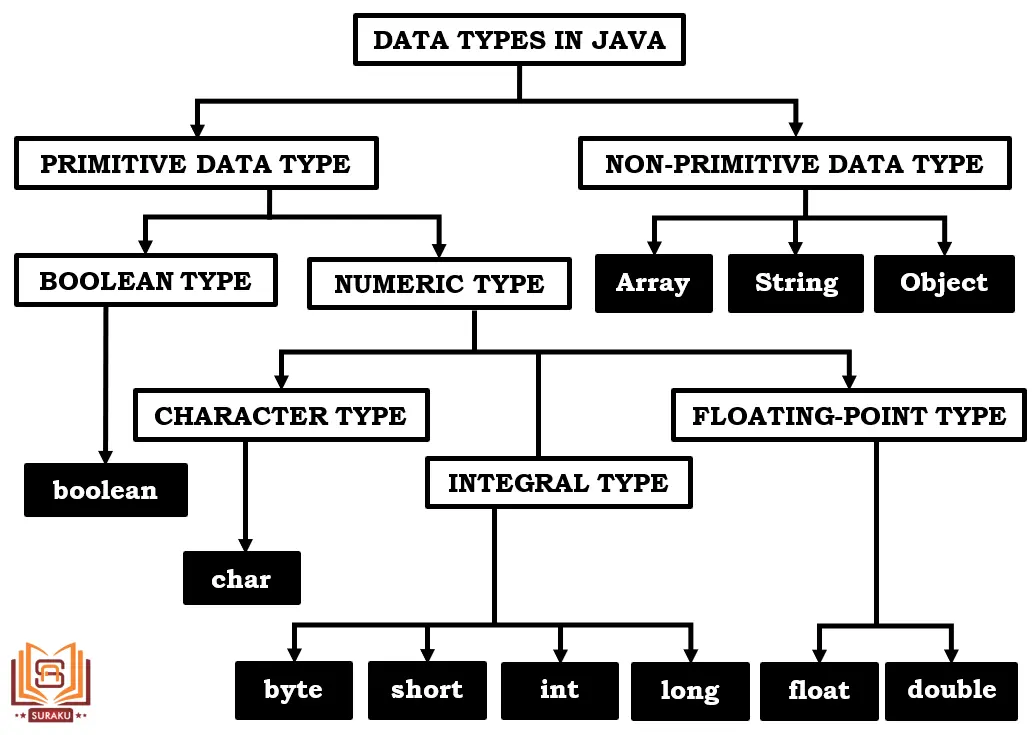
| DATA TYPE | SIZE | DEFAULT VALUE | WRAPPER CLASS |
|---|---|---|---|
| boolean | 1 Bit | false | Boolean |
| char | 2 Byte | ‘u0000’ | Character |
| byte | 1 Byte | 0 | Byte |
| short | 2 Byte | 0 | Short |
| int | 4 Byte | 0 | Integer |
| long | 8 Byte | 0 | Long |
| float | 4 Byte | 0.0 | Float |
| double | 8 Byte | 0.0 | Double |
You have reached the end of this topic. Continue learning with the next topic below.
Thank you so much for taking the time to read my Computer Science MCQs section carefully. Your support and interest mean a lot, and I truly appreciate you being part of this journey. Stay connected for more insights and updates! If you'd like to explore more tutorials and insights, check out my YouTube channel.
Don’t forget to subscribe and stay connected for future updates.
| Student Name | |
|---|---|
| College |
| What's Say |
|---|