
This section contains carefully selected MCQs and Previous Year Questions with explanations to help students understand concepts and prepare effectively for examinations, interviews, and competitive tests.
Q: 1Which JDBC object is generally used to execute a parameterized SQL query?
Option B
In JDBC, a Statement or PreparedStatement is used to send SQL commands to a database. When a SQL query contains parameters (placeholders) whose values are supplied at runtime, PreparedStatement is generally used. A parameterized query uses the ? symbol as a placeholder.
PreparedStatement ps = con.prepareStatement("SELECT * FROM Student WHERE rollNo = ?");
ps.setInt(1, 101);
ResultSet rs = ps.executeQuery();
Here, ? is the parameter placeholder, and setInt() supplies its value.
PreparedStatement is specifically designed for precompiled/parameterized SQL statements. It makes it easier to supply different values to the same SQL statement and, when parameters are bound properly, helps prevent SQL injection.
SQL Injection is a security attack in which an attacker provides specially crafted input that changes the meaning of an SQL query executed by an application. It usually happens when user input is directly concatenated into an SQL query instead of being safely treated as data.
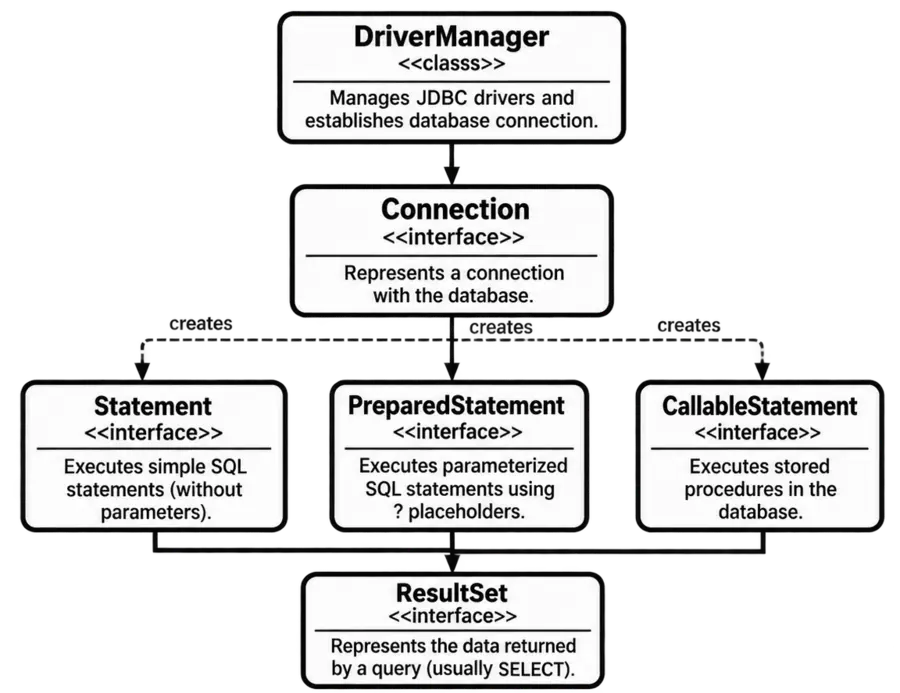
Important JDBC Objects:
| JDBC Object | Type | Description |
|---|---|---|
| Connection | Interface | Represents a connection between a Java application and a database. |
| Statement | Interface | Used to execute simple SQL statements that do not require parameters. |
| PreparedStatement | Interface | Used to execute parameterized SQL statements containing ? placeholders. It is preferred when values are supplied at runtime. |
| CallableStatement | Interface | Used to execute stored procedures in a database. |
| ResultSet | Interface | Represents the data returned by a query, usually a SELECT query. |
| DriverManager | Class | Manages JDBC drivers and is commonly used to establish a database connection. |
Q: 2Which method is generally used for executing a SELECT query?
Option D
In JDBC, a SELECT query is used to retrieve data from a database. The executeQuery() method is generally used to execute a SELECT statement and returns a ResultSet containing the rows returned by the query.
E.g.:
PreparedStatement ps = con.prepareStatement("SELECT * FROM Student");
ResultSet rs = ps.executeQuery();
Here, executeQuery() executes the SELECT statement, and the returned ResultSet contains the retrieved records.
Important JDBC Methods:
| Method Name | Class / Interface | Description | Returned Value |
|---|---|---|---|
| executeQuery() | Statement, PreparedStatement, CallableStatement | Executes a SQL statement that normally returns a result set, such as a SELECT query. | ResultSet |
| executeUpdate() | Statement, PreparedStatement, CallableStatement | Executes SQL statements such as INSERT, UPDATE, and DELETE, or DDL statements that do not return a result set. | int |
| execute() | Statement, PreparedStatement, CallableStatement | Executes a SQL statement when the type of result may vary. | boolean |
| executeBatch() | Statement, PreparedStatement, CallableStatement | Executes a batch of SQL commands together. | int[] |
| addBatch() | Statement, PreparedStatement | Adds a SQL command or parameterized command to the current batch for later execution. | void |
| clearBatch() | Statement, PreparedStatement | Removes all commands currently added to the batch. | void |
| setInt() | PreparedStatement | Sets an integer value for a specified ? parameter. | void |
| setString() | PreparedStatement | Sets a string value for a specified ? parameter. | void |
| setDouble() | PreparedStatement | Sets a double-precision value for a specified ? parameter. | void |
| setDate() | PreparedStatement | Sets a SQL DATE value for a specified ? parameter. | void |
| next() | ResultSet | Moves the cursor to the next row of the result set. | boolean |
| getInt() | ResultSet | Retrieves an integer value from the current row. | int |
| getString() | ResultSet | Retrieves a string value from the current row. | String |
| close() | Statement, PreparedStatement, ResultSet | Releases the JDBC resource and associated resources. | void |
Q: 3Which method is generally used for INSERT, UPDATE, and DELETE?
Option B
In JDBC, INSERT, UPDATE, and DELETE statements are used to modify data in a database rather than retrieve rows.
The executeUpdate() method is generally used for these statements. It returns an int value representing the number of rows affected by the operation.
E.g.:
PreparedStatement ps = con.prepareStatement("UPDATE Student SET name = ? WHERE rollNo = ?");
ps.setString(1, "Suresh");
ps.setInt(2, 101);
int rows = ps.executeUpdate();
If one student record is updated, rows will generally contain 1.
| Method | Description | Returned Value |
|---|---|---|
| executeQuery() | It is generally used to execute a SQL statement that returns a set of rows, such as a SELECT query. | ResultSet |
| executeUpdate() | It is generally used to execute SQL statements that modify data, such as INSERT, UPDATE, and DELETE, and it returns the number of affected rows. | int |
| execute() | It is used when a SQL statement may produce different types of results, such as a ResultSet or an update count, and it indicates the type of the first result. In other word, execute() is more general-purpose. It is useful when you don't know in advance whether the first result produced by the SQL will be a ResultSet or an update count. | boolean |
Q: 4The JDBC-ODBC bridge is
Option B
JDBC (Java Database Connectivity) is used by Java programs to communicate with databases. ODBC (Open Database Connectivity) is another database connectivity standard.
The old JDBC-ODBC Bridge acted as a translator between JDBC calls from a Java program and ODBC calls understood by an ODBC driver. It was a Type 1 JDBC driver.
The traditional Java JDBC-ODBC Bridge did not support concurrent access from different threads. It used synchronized methods to serialize the calls made to ODBC.
In simple terms, even if a Java program had multiple threads, the Bridge processed its ODBC calls one at a time rather than allowing them to proceed concurrently.
Q: 5In which of the following does the JDBC type represent a “single precision” floating-point number that supports seven digits of precision?
Option B
In JDBC, the SQL data type REAL represents a single-precision floating-point number. It is generally used to store floating-point values with approximately seven digits of precision.
JDBC provides the java.sql.Types class, which contains constants representing SQL data types. The REAL type is represented by Types.REAL.
| JDBC Type | Description |
|---|---|
| DOUBLE | Represents a double-precision floating-point number. |
| REAL | Represents a single-precision floating-point number, typically supporting about seven digits of precision. |
| FLOAT | Represents an SQL FLOAT type; its exact precision can depend on the database. |
| INTEGER | Represents an integer value without a fractional part. |
Q: 6Which method is used to perform DML statements in JDBC?
Option B
In JDBC (Java Database Connectivity), DML (Data Manipulation Language) statements are used to modify data in database tables. Common DML statements include INSERT, UPDATE, and DELETE.
JDBC provides different methods for executing SQL statements, and the method depends on the type of SQL statement being executed. The executeUpdate() method is specifically used for DML statements because it returns an int value representing the number of rows affected by the operation.
Syntax:
int executeUpdate(String sql) throws SQLException
E.g.:
Statement stmt = connection.createStatement();
int rows = stmt.executeUpdate("UPDATE Student SET name = 'Suresh' WHERE id = 101");
Q: 7What is the purpose of commit() in JDBC transaction processing?
Option D
In JDBC, a transaction is a group of one or more database operations that are treated as a single unit of work.
For example, transferring money from one account to another may involve two operations, deducting money from one account and adding it to another.
The commit() method is used to make all changes performed in the current transaction permanent in the database.
E.g.:
Connection con = DriverManager.getConnection(...);
con.setAutoCommit(false);
Statement stmt = con.createStatement();
stmt.executeUpdate("UPDATE Account SET balance = balance - 100 WHERE id = 1");
stmt.executeUpdate("UPDATE Account SET balance = balance + 100 WHERE id = 2");
con.commit();
Here, setAutoCommit(false) allows the operations to be controlled as a transaction. The commit() call permanently applies the pending changes.
Note:
The getConnection() method of DriverManager class is used to establish a connection between a Java application and a database. It generally receives a database URL, username, and password, and returns a Connection object when the connection is successfully established.
The commit() vs rollback():
| Method | Purpose |
|---|---|
| commit() | Permanently applies the pending changes of the current transaction. |
| rollback() | Cancels the pending changes of the current transaction and returns the database to the previous transactional state. |
Q: 8Which JDBC object represents the result of a query?
Option C
In JDBC, when a SQL query such as a SELECT statement retrieves data from a database, the returned rows are represented by a ResultSet object.
A ResultSet provides a cursor that allows the Java program to read the retrieved records row by row.
Statement stmt = con.createStatement();
ResultSet rs = stmt.executeQuery("SELECT * FROM Student");
Here, executeQuery() executes the SELECT query, and the returned ResultSet contains the query result. The records can then be accessed using next():
while (rs.next())
{
System.out.println(rs.getString("name"));
}
You have reached the end of this topic. Continue learning with the next topic below.
Thank you so much for taking the time to read my Computer Science MCQs section carefully. Your support and interest mean a lot, and I truly appreciate you being part of this journey. Stay connected for more insights and updates! If you'd like to explore more tutorials and insights, check out my YouTube channel.
Don’t forget to subscribe and stay connected for future updates.
| Student Name | |
|---|---|
| College |
| What's Say |
|---|