
This section contains carefully selected MCQs and Previous Year Questions with explanations to help students understand concepts and prepare effectively for examinations, interviews, and competitive tests.
Q: 1What happens if a finally block contains return?
Option C
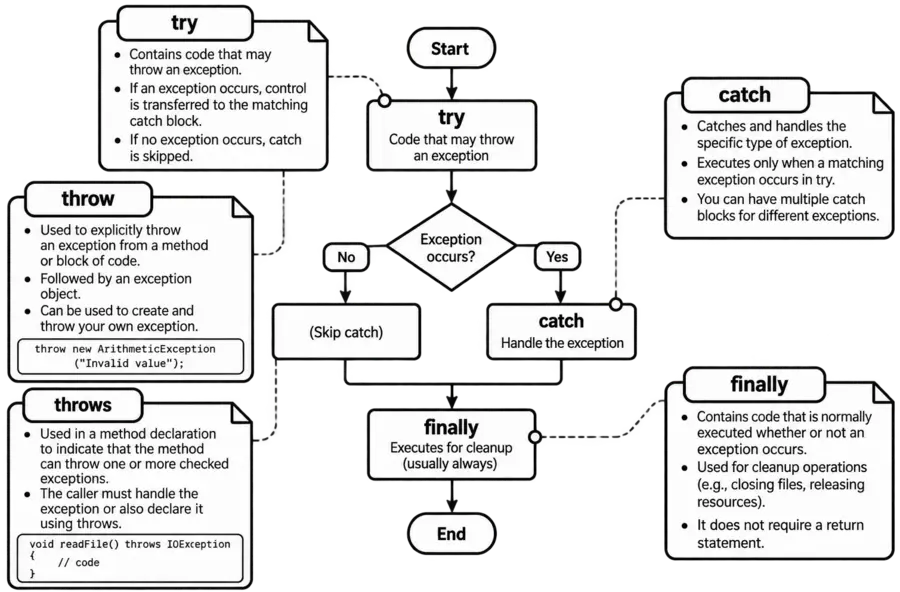
In Java, exception handling commonly uses try, catch, and finally. The try block contains code that may cause an exception, the catch block handles a matching exception, and the finally block contains code that is normally executed before control leaves the try/catch structure.
A return statement is used to terminate a method and send a value back to the calling code.
Normally, when Java encounters a return inside the try or catch block, it prepares to return that value. However, before the method actually finishes, the finally block is executed.
If the finally block also contains a return, that return becomes the final result. Therefore, the return statement in finally can override the return value that was already pending.
E.g.:
class TestExample
{
static int getValue()
{
try
{
return 10;
}
finally
{
return 20;
}
}
public static void main(String args[])
{
System.out.println(getValue());
}
}
OUTPUT
20
In this,
A return in finally can also suppress an exception.
E.g.:
class TestExample
{
static int getValue()
{
try
{
throw new ArithmeticException("Division Error");
}
finally
{
return 22;
}
}
public static void main(String args[])
{
System.out.println(getValue());
}
}
OUTPUT
22
Here, the try block throws an ArithmeticException. Normally, that exception would propagate to the caller. However, the finally block executes return 22, so the exception is suppressed and the method returns 22.
Therefore, although Java allows return inside finally, it is generally not recommended, because it can hide an earlier return value or suppress an exception, making the program difficult to understand and debug.
Q: 2An exception in Java is a condition which is caused by __________.
Option A
In Java, an exception is an abnormal condition that occurs during the execution of a program and interrupts the normal flow of execution. Exceptions commonly occur because of problems such as dividing an integer by zero, accessing an invalid array index, or trying to use an object that contains null.
Q: 3What is the output of following Java piece of code?
try
{
int x = 10/0;
System.out.print("A");
}
catch (ArithmeticException e)
{
System.out.print("B");
}
finally
{
System.out.print("C");
}
Option D
In Java, the try-catch-finally structure is used to handle exceptions. The try block contains code that may produce an exception, the catch block handles the exception, and the finally block is generally used for code that should execute whether an exception occurs or not.
In the given code, the statement int x = 10/0; attempts to divide an integer by zero. This causes an ArithmeticException.
Because the exception occurs at this statement, the next statement System.out.print("A"); is not executed. Java immediately transfers control to the matching catch block.
The catch block then executes System.out.print("B"); so, B is printed. After the catch block finishes, the finally block executes System.out.print("C"); so, C is also printed.
Therefore, the final output is BC.
Q: 4Which exception is checked?
Option C
Java exceptions can be broadly divided into checked exceptions and unchecked exceptions. The main difference is whether the compiler checks that the exception is handled or declared.
A checked exception is an exception that the compiler requires the programmer to handle using a try-catch block or declare using the throws keyword.
IOException is a checked exception. For example, when a program reads data from a file, an input/output problem may occur. Java requires the programmer to handle or declare this possibility.
Q: 5Which statement about finally is generally correct?
Option C
In Java, the finally block is used to contain statements that should normally be executed after the try or catch block, regardless of whether an exception occurs. It is commonly used for cleanup operations, such as closing files, database connections, or other resources.
E.g.:
class TestExample
{
public static void main(String args[])
{
try
{
System.out.println("Try Block");
}
catch (Exception e)
{
System.out.println("Catch Block");
}
finally
{
System.out.println("Finally Block");
}
}
}
OUTPUT
Try Block
Finally Block
Here, no exception occurs, but the finally block still executes.
E.g.:
class TestExample
{
public static void main(String args[])
{
try
{
int x = 10/0;
}
catch (ArithmeticException e)
{
System.out.println("Exception Handled");
}
finally
{
System.out.println("Finally Block");
}
}
}
OUTPUT
Exception Handled
Finally Block
In this case, the exception occurs, the matching catch block executes, and then the finally block executes.
Q: 6Which of these exceptions is thrown in cases when the file specified for writing is not found?
Option C
In Java, when a program attempts to open a file for reading or writing and that file does not exist or cannot be located in the specified path, Java throws a FileNotFoundException. This exception is a subclass of IOException and specifically indicates problems related to missing files.
Q: 7In the context of error handling in C++ and Java, which of the following is true about ‘finally’?
Option D
In Exception Handling (Java), the finally block is used to execute important code such as closing files or releasing resources. It is designed to run no matter what happens in the try block.
Whether an exception occurs or not, and even if it is handled or not, the finally block is always executed.
Q: 8Which keyword explicitly throws an exception object?
Option B
In Java, the throw keyword is used to explicitly throw an exception object from a particular point in the program. It is followed by an exception object, which is usually created using the new keyword.
class TestExample
{
public static void main(String args[])
{
int age=15;
if (age<18)
{
throw new IllegalArgumentException("Age must be 18 or above");
}
System.out.println("Eligible");
}
}
Here, throw new IllegalArgumentException("Age must be 18 or above"); explicitly creates and throws an IllegalArgumentException object. Once the throw statement is executed, normal execution of that block stops and Java looks for a suitable catch block to handle the exception.
The throw keyword is different from throws. The throw keyword is used to actually throw a specific exception object, whereas throws is used in a method declaration to indicate that a method may pass one or more exceptions to its caller.
Q: 9Which of these exception is thrown by close() and read() methods?
Option A
In Java, input and output operations are handled through classes and interfaces in the java.io package.
Operations such as reading data from a stream and closing a stream can encounter problems, for example, if the underlying resource cannot be accessed properly or an I/O operation fails. Java represents such input/output-related problems using the IOException class.
The read() and close() methods are commonly declared with throws IOException in Java I/O classes.
Q: 10Which of these package contains the exception StackOverflowError in Java?
Option A
In Java, StackOverflowError belongs to the java.lang package. The java.lang package contains fundamental classes and types that are essential for Java programs, such as Object, String, System, Math, Thread, Exception, Error, and many others. Classes from java.lang are automatically available to every Java program, so an explicit import java.lang.*; statement is normally not required.
StackOverflowError occurs when the Java Virtual Machine (JVM) stack memory is exhausted. A common reason is excessive or infinite method recursion.
Important java.lang Classes and Methods:
| Class | Main Purpose | Important Methods |
|---|---|---|
| Object | Root class of the Java class hierarchy. | toString(), equals(), hashCode(), getClass(), clone(), wait(), notify(), notifyAll() |
| Class | Represents classes and interfaces at runtime. | forName(), getName(), getSuperclass(), getInterfaces(), newInstance() |
| String | Represents immutable character strings. | length(), charAt(), substring(), equals(), equalsIgnoreCase(), compareTo(), concat(), indexOf(), lastIndexOf(), replace(), split(), trim(), toLowerCase(), toUpperCase(), contains() |
| StringBuffer | Represents a mutable and synchronized sequence of characters. | append(), insert(), delete(), replace(), reverse(), length(), capacity(), charAt() |
| StringBuilder | Represents a mutable sequence of characters. | append(), insert(), delete(), replace(), reverse(), length(), capacity(), charAt() |
| Math | Provides mathematical operations. | abs(), sqrt(), pow(), max(), min(), round(), random(), ceil(), floor(), sin(), cos(), tan() |
| System | Provides system-related facilities and standard I/O. | out, in, err, currentTimeMillis(), nanoTime(), arraycopy(), exit(), gc(), getProperty(), getenv() |
| Thread | Represents a thread of execution. | start(), run(), sleep(), join(), yield(), currentThread(), getName(), setName(), getPriority(), setPriority(), isAlive(), interrupt() |
| Number | Abstract superclass for numeric wrapper classes. | byteValue(), shortValue(), intValue(), longValue(), floatValue(), doubleValue() |
| Integer | Wrapper class for int. | parseInt(), valueOf(), intValue(), doubleValue(), compare(), toString(), max(), min() |
| Long | Wrapper class for long. | parseLong(), valueOf(), longValue(), intValue(), doubleValue(), compare(), toString() |
| Float | Wrapper class for float. | parseFloat(), valueOf(), floatValue(), doubleValue(), isNaN(), isInfinite() |
| Double | Wrapper class for double. | parseDouble(), valueOf(), doubleValue(), isNaN(), isInfinite(), compare() |
| Byte | Wrapper class for byte. | parseByte(), valueOf(), byteValue(), intValue(), doubleValue(), compare() |
| Short | Wrapper class for short. | parseShort(), valueOf(), shortValue(), intValue(), doubleValue(), compare() |
| Boolean | Wrapper class for boolean. | parseBoolean(), valueOf(), booleanValue(), compare(), toString() |
| Character | Wrapper class for char and character-related operations. | isLetter(), isDigit(), isWhitespace(), isUpperCase(), isLowerCase(), toUpperCase(), toLowerCase(), charValue() |
| Void | Represents the void type. | TYPE |
| Runtime | Provides access to the runtime environment. | getRuntime(), exec(), availableProcessors(), freeMemory(), totalMemory(), maxMemory(), gc() |
| Throwable | Root class for errors and exceptions. | getMessage(), getCause(), initCause(), printStackTrace(), toString() |
| Exception | Represents conditions that applications may handle. | getMessage(), getCause(), printStackTrace() |
| RuntimeException | Superclass of many unchecked exceptions. | Inherited methods such as getMessage(), getCause(), printStackTrace() |
| Error | Represents serious problems generally not intended for normal application handling. | getMessage(), getCause(), printStackTrace() |
| ClassLoader | Loads classes into the JVM. | loadClass(), getResource(), getResourceAsStream(), getSystemClassLoader() |
| Runnable | Represents an operation that can be executed by a thread. | run() |
| AutoCloseable | Represents an object that can be closed automatically. | close() |
Thank you so much for taking the time to read my Computer Science MCQs section carefully. Your support and interest mean a lot, and I truly appreciate you being part of this journey. Stay connected for more insights and updates! If you'd like to explore more tutorials and insights, check out my YouTube channel.
Don’t forget to subscribe and stay connected for future updates.
| Student Name | |
|---|---|
| College |
| What's Say |
|---|