
This section contains carefully selected MCQs and Previous Year Questions with explanations to help students understand concepts and prepare effectively for examinations, interviews, and competitive tests.
Q: 1In the statement ‘System.out.println("Hello World!")’, the keyword 'out' stands for the following—
Option A
In Java, System.out.println("Hello World!") is used to print messages to the console.
| COMPONENT | TYPE | DESCRIPTION |
|---|---|---|
| System | System is a class, defined in java.lang package. | Provides access to standard input, output, and error streams; part of Java core library. |
| out | public static member of System class. | The out is an instance of the PrintStream class, which provides methods like println() to display output. |
| println() | Method of PrintStream class. | Prints the given message or value to the console and moves to the next line. |
Q: 2Which statement about System.out is correct?
Option B
In Java, System.out is the standard output stream used to display information on the console. The out variable is a static field of the System class, and it refers to an object of the PrintStream class. Therefore, methods such as print(), println(), and printf() can be used with System.out.
Q: 3Which method prints formatted output?
Option A
In Java, the format() method of the PrintStream class is used to print formatted output. Since System.out refers to an object of the PrintStream class, we can use System.out.format() to display values in a specified format.
public class FormatExample
{
public static void main(String args[])
{
String name = "Suresh Kulahry";
int marks = 85;
double percentage = 85.50;
System.out.format("Name: %s\n",name);
System.out.format("Marks: %d%n", marks);
System.out.format("Percentage: %.2f", percentage);
}
}
Here:
Common Format Specifiers Used with System.out.format():
| Format Specifier | Data Type / Purpose | Example | Output |
|---|---|---|---|
| %d | Decimal integer | System.out.format("%d", 25); | 25 |
| %f | Floating-point value | System.out.format("%f", 10.5); | 10.500000 |
| %.2f | Floating-point with 2 decimal places | System.out.format("%.2f", 10.5); | 10.50 |
| %e | Scientific notation | System.out.format("%e", 1000.0); | 1.000000e+03 |
| %g | General floating-point format | System.out.format("%g", 10.5); | 10.5000 |
| %s | String | System.out.format("%s", "Java"); | Java |
| %c | Character | System.out.format("%c", 'A'); | A |
| %b | Boolean | System.out.format("%b", true); | true |
| %x | Integer in hexadecimal | System.out.format("%x", 255); | ff |
| %o | Integer in octal | System.out.format("%o", 10); | 12 |
| %h | Hash code in hexadecimal | System.out.format("%h", "Java"); | Hash value |
| %n | Platform-specific line separator | System.out.format("Hello%nWorld"); | Hello World |
| %% | Prints a literal % character | System.out.format("50%%"); | 50% |
Note:
The format specifiers such as %d, %f, %s, %c, etc. are not interpreted by print() or println(). They are specifically used with methods such as format() and printf().
Q: 4Which class is most appropriate for reading primitive data types conveniently from standard input?
Option D
In Java, the Scanner class is commonly used to read input from the standard input, which is usually the keyboard. It provides convenient methods for reading different types of primitive data, such as int, double, float, long, and boolean.
For example, nextInt() reads an integer, nextDouble() reads a double value, and nextBoolean() reads a Boolean value.
The Scanner class, available in the java.util package, provides different methods for reading input from the keyboard or other input sources. The Scanner class provides different types of methods, they are:
| Method | Purpose |
|---|---|
| next() | Reads the next token (word) from the input. |
| nextLine() | Reads the complete current line of input. |
| nextInt() | Reads an int value. |
| nextLong() | Reads a long value. |
| nextFloat() | Reads a float value. |
| nextDouble() | Reads a double value. |
| nextShort() | Reads a short value. |
| nextByte() | Reads a byte value. |
| nextBoolean() | Reads a boolean value (true or false). |
| hasNext() | Checks whether another token is available. |
| hasNextLine() | Checks whether another line is available. |
| hasNextInt() | Checks whether the next token can be interpreted as an int. |
| hasNextLong() | Checks whether the next token can be interpreted as a long. |
| hasNextFloat() | Checks whether the next token can be interpreted as a float. |
| hasNextDouble() | Checks whether the next token can be interpreted as a double. |
| hasNextBoolean() | Checks whether the next token can be interpreted as a boolean. |
| skip() | Skips input that matches a specified pattern. |
| useDelimiter() | Changes the delimiter used by the scanner to separate tokens. |
| close() | Closes the scanner and its underlying input source. |
The next() stops reading when it encounters whitespace, whereas nextLine() reads the complete line, including spaces.
import java.util.Scanner;
public class ScannerMethods
{
    public static void main(String args[])
    {
        Scanner sc = new Scanner(System.in);
        System.out.print("Enter Name ");
        String name = sc.nextLine();
        System.out.print("Enter City: ");
        String city = sc.next();
        System.out.print("Enter Age: ");
        int age = sc.nextInt();
        System.out.print("Enter Mobile Number: ");
        long mobile = sc.nextLong();
        System.out.print("Enter Salary: ");
        double salary = sc.nextDouble();
        System.out.print("Are You a Student? (true/false): ");
        boolean student = sc.nextBoolean();
        System.out.println("Your Details");
        System.out.println("Name : "+name);
        System.out.println("City :"+city);
        System.out.println("Age : "+age);
        System.out.println("Mobile : "+mobile);
        System.out.println("Salary : "+salary);
        System.out.println("Student :"+student);
        sc.close();
    }
}
OUTPUT
Enter Name Suresh Kulahry
Enter City: Jaipur
Enter Age: 31
Enter Mobile Number: 9828121018
Enter Salary: 78965.58
Are You a Student? (true/false): true
Your Details
Name : Suresh Kulahry
City :Jaipur
Age : 31
Mobile : 9828121018
Salary : 78965.58
Student :true
Q: 5What is the right syntax to read an integer from the user in Java?
Option C
In Java, to read input from the user, we commonly use the Scanner class, which is part of the java.util package. First, a Scanner object is created using new Scanner(System.in), which connects the scanner to standard input like keyboard.
The Scanner class provides several methods to read different types of data. To read an integer, the correct method is nextInt().
Q: 6What happens when following code get executed?
Scanner sc = new Scanner(System.in);
int a = sc.nextInt();
String str = sc.nextLine();
If the user enters 55 followed by Enter, what is generally stored in str?
Option C
Java provides the Scanner class to take input from the keyboard. It is available in the java.util package. The Scanner class provides different methods for reading different types of input. For example, nextInt() is used to read an integer, while nextLine() is used to read a complete line of text.
In the given code, suppose the user enters 55 and presses Enter. The nextInt() method reads the integer 55 and stores it in a. However, nextInt() does not read the Enter key (line separator) after the number. That line separator remains in the input.
When sc.nextLine() is executed, it reads the remaining part of the current line up to the Enter key. Since there is nothing between 55 and the Enter key, nextLine() reads an empty line and returns an empty string "".
Therefore, the values are, a=55 and str="".
Note:
It is important to understand that "" and null are different. An empty string "" is a String containing zero characters, whereas null means that a reference does not refer to any object. In this case, nextLine() returns an empty string, not null.
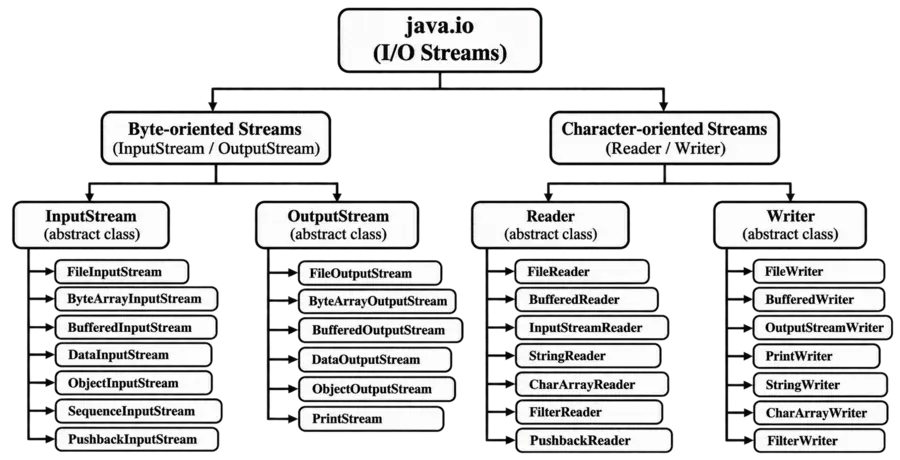
Q: 7Which class is character-oriented rather than byte-oriented?
Option C
Java provides two main types of I/O streams, byte-oriented streams and character-oriented streams.
The FileReader class is a character-oriented class. It is used to read character data from a file and is based on the Reader class hierarchy.
You have reached the end of this topic. Continue learning with the next topic below.
Thank you so much for taking the time to read my Computer Science MCQs section carefully. Your support and interest mean a lot, and I truly appreciate you being part of this journey. Stay connected for more insights and updates! If you'd like to explore more tutorials and insights, check out my YouTube channel.
Don’t forget to subscribe and stay connected for future updates.
| Student Name | |
|---|---|
| College |
| What's Say |
|---|