
This section contains carefully selected MCQs and Previous Year Questions with explanations to help students understand concepts and prepare effectively for examinations, interviews, and competitive tests.
Q: 1Which interface must a class generally implement to use default Java object serialization?
Option A
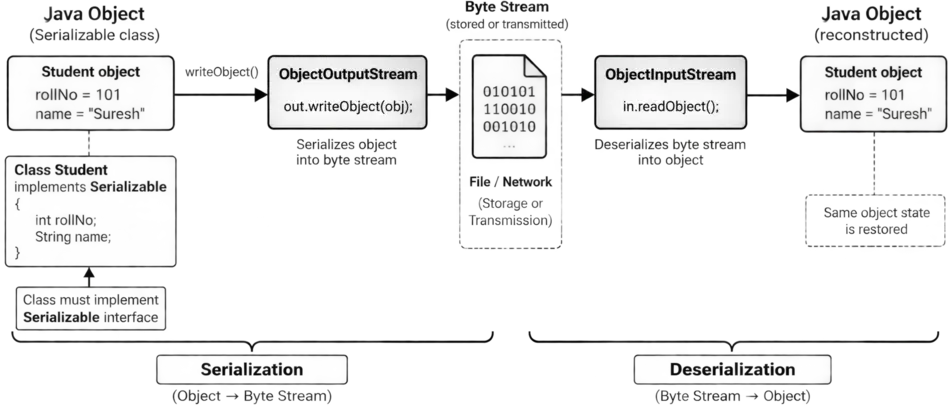
In Java, serialization is the process of converting the state of an object into a byte stream. This byte stream can be stored in a file, sent over a network, or used for other forms of object persistence. Later, the byte stream can be converted back into an object through deserialization.
For Java's default object serialization mechanism, a class generally implements the Serializable interface from the java.io package.
The Serializable is a marker interface. A marker interface is an interface that does not require the implementing class to provide any methods.
E.g.:
class Student implements Serializable
{
// No Serializable methods need to be implemented
}
The Serializable interface mainly provides information to Java's serialization mechanism that objects of this class can be serialized. The actual serialization is commonly performed using ObjectOutputStream.
| Concept | Meaning | Common Class |
|---|---|---|
| Serialization | Converts an object into a byte stream. | ObjectOutputStream |
| Deserialization | Reconstructs an object from a byte stream. | ObjectInputStream |
| Interface for default serialization | Indicates that objects can be serialized. | Serializable |
Note:
Externalizable is also related to serialization, but it is different from Serializable. With Serializable, Java can perform the default serialization process automatically. With Externalizable, the class takes more direct control over how its state is written and restored by implementing methods such as writeExternal() and readExternal().
Serializable vs Cloneable:
These two interfaces are sometimes confused because both are marker interfaces.
Q: 2What happens to a transient instance field during default serialization?
Option D
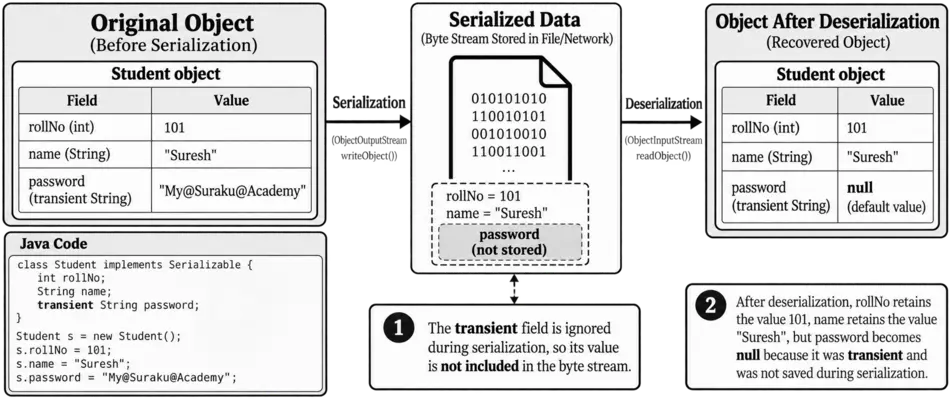
In Java, when an object is serialized using the default serialization mechanism, its instance fields are normally saved as part of the object's state. However, a field declared with the transient keyword is treated differently.
The transient keyword tells Java, “do not save this field during default serialization”.
Remember, transient does not mean that the field is permanently removed from the object. It only means that the field is excluded from default serialization. The field still exists in the object and can be used normally while the object is in memory.
E.g.:
import java.io.Serializable;
class Student implements Serializable
{
int rollNo = 101;
String name = "Suresh";
transient String password = "My@Suraku@Academy";
}
Suppose this object is serialized. The values of rollNo and name are included in the serialized data, but password is not serialized because it is marked transient.
When the object is later deserialized, Java does not recover the original value of the transient field. Instead, the field gets its default value.
After deserialization, rollNo retains the value 101, name retains the value "Suresh", but the password field becomes null because it was declared as transient and was not saved during serialization.
Note:
The static fields are also not serialized as part of an individual object's state. A static field belongs to the class, whereas serialization primarily deals with the state of a particular object. So,
Q: 3Which classes are primarily used for writing and reading serialized objects?
Option B
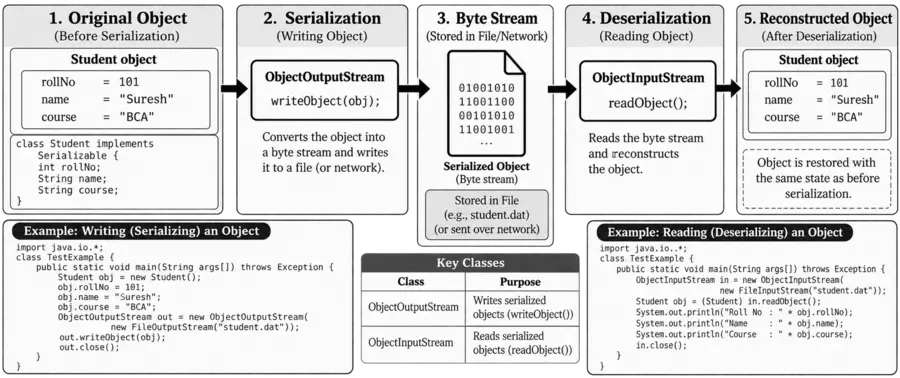
Java provides special classes for object serialization and deserialization. Serialization converts an object's state into a byte stream, while deserialization reconstructs the object from that byte stream. The two important classes are:
E.g.: An object can be serialized using ObjectOutputStream:
import java.io.*;
class Student implements Serializable
{
int rollNo = 101;
String name = "Suresh";
}
class TestExample
{
public static void main(String args[]) throws Exception
{
Student obj = new Student();
ObjectOutputStream out = new ObjectOutputStream(new FileOutputStream("student.dat"));
out.writeObject(obj);
out.close();
}
}
E.g.: To read the object back, ObjectInputStream is used:
import java.io.*;
class TestExample
{
public static void main(String args[]) throws Exception
{
ObjectInputStream in = new ObjectInputStream(new FileInputStream("student.dat"));
Student obj = (Student) in.readObject();
System.out.println(obj.rollNo);
System.out.println(obj.name);
in.close();
}
}
Q: 4Which interface provides custom serialization methods such as writeExternal() and readExternal()?
Option A
In Java, Externalizable is an interface used when a class needs more control over how its objects are serialized and deserialized.
Unlike Serializable, which allows Java to perform default serialization, Externalizable requires the class to explicitly define how its data should be written and read.
The Externalizable interface provides two important methods:
The writeExternal() defines how the object's data should be written during serialization.
The readExternal() defines how the object's data should be read during deserialization.
| Serializable | Externalizable |
|---|---|
| Serializable is used when Java's default serialization mechanism is sufficient. The JVM automatically handles the serialization and deserialization of the object's serializable state. | Externalizable is used when the programmer needs custom control over serialization and deserialization. The programmer defines how the object's data is written using writeExternal() and restored using readExternal(). |
| It is a marker interface, so the class does not need to implement any methods. | It is an interface that requires the class to implement writeExternal() and readExternal(). |
| A public no-argument constructor is not specifically required for deserialization. | A public no-argument constructor is required for deserialization. |
| It provides less direct control over which object data is serialized. | It provides greater control over which data is serialized and how it is restored. |
Q: 5Which of these classes can return more than one character to be returned to input stream?
Option A
In Java, character input is handled through classes derived from the Reader class. Normally, when characters are read from an input stream, they move forward through the stream.
However, sometimes a program needs to put already-read characters back into the input stream so that they can be read again. This process is called pushback.
The PushbackReader class, available in the java.io package, is specifically designed for this purpose. It provides the unread() method, which allows characters that have already been read to be returned to the input stream. It can return more than one character to the input stream by using the unread(char[] cbuf, int off, int len) method or by calling unread() multiple times.
E.g.:
import java.io.*;
class Example
{
public static void main(String args[]) throws IOException
{
StringReader input = new StringReader("ABC");
PushbackReader reader = new PushbackReader(input, 3);
char[] buffer = new char[2];
reader.read(buffer);
System.out.println("Read: " + new String(buffer));
reader.unread(buffer);
System.out.println("Read Again: " + (char)reader.read());
System.out.println("Read Again: " + (char)reader.read());
}
}
OUTPUT
Read: AB
Read Again: A
Read Again: B
Q: 6What is the purpose of serialVersionUID?
Option B
When Java serializes an object, it stores information that allows the JVM to check whether the class used during deserialization is compatible with the class that was used during serialization.
The serialVersionUID is a special long value used as the version identifier of a serializable class. It is declared using static final.
Note:
If a serializable class does not explicitly declare serialVersionUID, Java can automatically calculate a default serialVersionUID based on details of the class.
Q: 7Which of this class is used to read characters in a file?
Option A
In Java, character streams are used to read and write character data, such as text files. The FileReader class is specifically designed to read characters directly from a file.
FileReader belongs to the java.io package and is a convenient character-stream class for reading text files.
Q: 8The InputStream class is:
Option C
The InputStream is an abstract class in the java.io package. It is the superclass for many classes that read data as a stream of bytes.
The main purpose of InputStream is to provide methods for reading 8-bit bytes from an input source. Its most important method is read(), which reads the next byte of data and returns it as an int. It returns -1 when the end of the stream is reached.
E.g.: FileInputStream is a concrete subclass of InputStream used to read bytes from a file:
import java.io.FileInputStream;
import java.io.IOException;
class Example
{
public static void main(String args[]) throws IOException
{
FileInputStream input = new FileInputStream("myfile.txt");
int data;
while ((data = input.read()) != -1)
{
System.out.print((char) data);
}
input.close();
}
}
Q: 9Which of the following streams is used to deserialize the primitive data and objects in Java?
Option D
In Java, streams are used to handle input and output of data. The core concept here is serialization and deserialization:
Serialization: Converting an object into a byte stream so it can be saved to a file or sent over a network.
Deserialization: Reconstructing the object from the byte stream back into a Java object.
To handle deserialization of primitive data types and objects, Java provides the ObjectInputStream class.
Q: 10What is the correct way to close a file in Java after writing to it?
Option C
The correct way to close a file in Java after writing to it is to use the close() method of the FileWriter class. This method is called on the FileWriter object after all writing operations are complete.
Closing the file writer releases any system resources associated with it, flushes buffers, and ensures that data is properly saved to the file. For example, fileWriter.close(); is the standard way to close the file after writing.
Thank you so much for taking the time to read my Computer Science MCQs section carefully. Your support and interest mean a lot, and I truly appreciate you being part of this journey. Stay connected for more insights and updates! If you'd like to explore more tutorials and insights, check out my YouTube channel.
Don’t forget to subscribe and stay connected for future updates.
| Student Name | |
|---|---|
| College |
| What's Say |
|---|