
Real life analogy for SMA and DMA
Problem : (SMA)
- Suppose you are organizing a wedding and you prepare food in advance for 1,000 people. If only 700 guests arrive, a large amount of food will be wasted. If 1200 guests arrive, there will not be enough food for everyone.
Solution : (DMA)
- Instead, imagine you keep the raw ingredients ready and start cooking food based on the actual number of guests who arrive.
- This way, you prepare only what is needed, avoiding both shortage and wastage.
- In programming, preparing food in advance is like static memory allocation, the size is fixed in advance.
- Preparing food as per requirement is like dynamic memory allocation, memory is allocated as needed during program execution.
Must Know:
- For executing the C program, the loader (part of operating system) reads the executable file (.exe file) and loads it into main memory. This memory is divided into different sections, each with its own purpose.
- The total maximum memory allocated for a C program is not a fixed value defined by the C language itself; instead, it depends on several factors like,
- Operating System.
- CPU architecture (32-bit or 64-bit).
- Available physical (RAM) and virtual memory.
- OS-imposed process limit etc.
But there is theoretical limit,
| System Used | Memory Limit | Addresses Range |
|---|---|---|
| 16-bit System | 216 bytes = 64 KB | 0 to 216-1 0 to 216 – 1 i.e., 0 to 65535 |
| 32-bit System | 232 bytes = 4 GB | 0 to 232 -1 |
| 64-bit System | 264 bytes = 16 EB | 0 to 264 -1 |
Memory Layout/Section of C program:
When a C program is loaded into memory, the Operating System arranges it into different segment. It refers to how different parts of a program are arranged and managed in memory during execution.
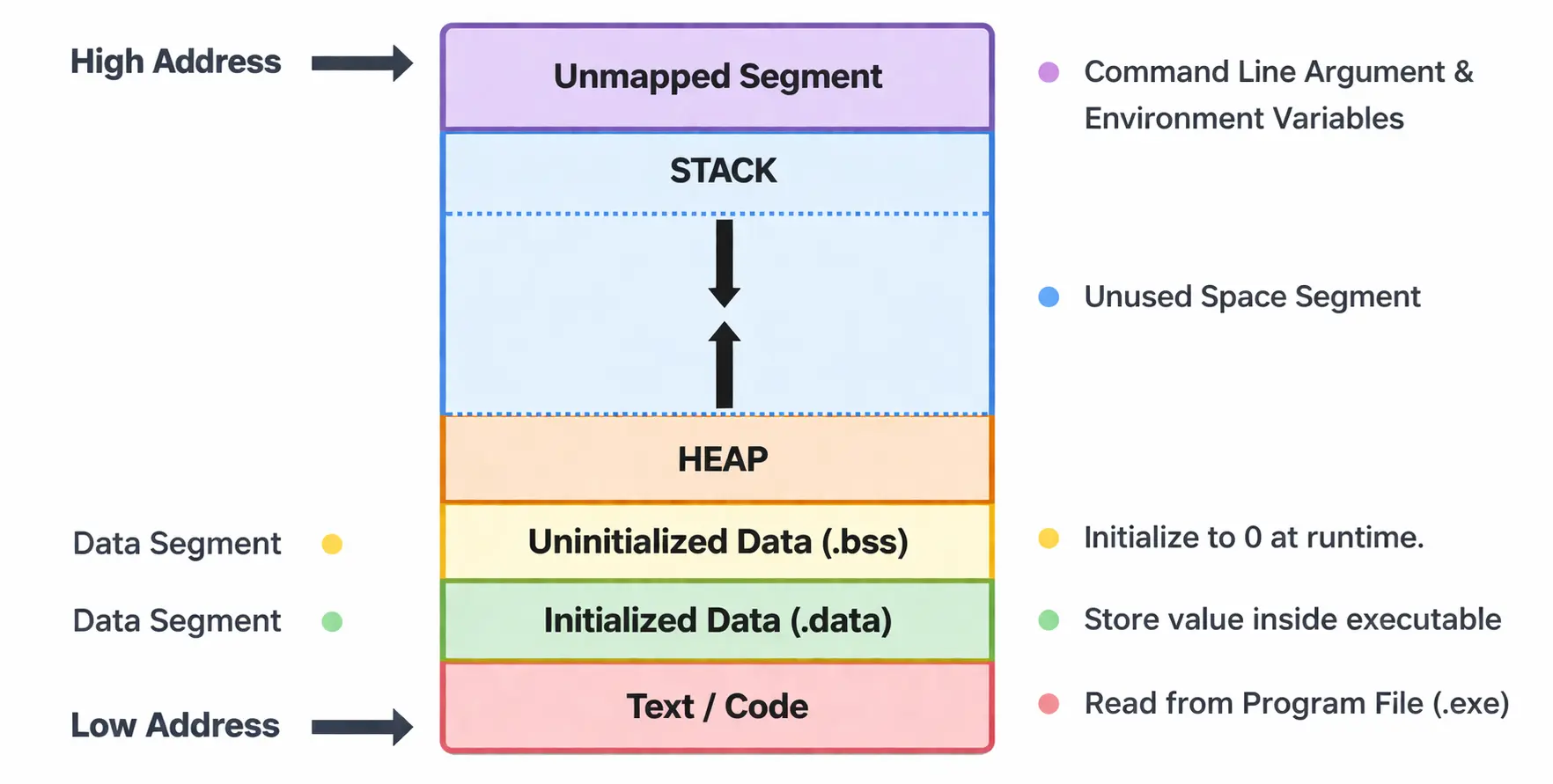
- Text / Code segment.
- Data segment.
- Initialized Data (.data)
- Uninitialized Data (.bss)
- Heap Segment.
- Unused Space Segment.
- Stack Segment.
- Unmapped / Additional Segments.
Text / Code Segment:
- It contains the executable machine code (.exe file) of the program — all function definitions, including main() and user-defined functions.
- Usually read-only to prevent accidental modification of code at runtime.
- Typically located at the lower memory addresses.
- This segment is often shared among processes running the same program.
Data Segment : Static Segment : Static Memory Allocation (SMA)
This segment stores global and static variables. It is present just above the code segment of the program and is divided into two parts:
- Initialized Data Segment (.data and .rodata)
- Uninitialized Data Segment (.bss)
Initialized Data Segment (.data and .rodata)
- Contains global variables, static variables (whether local or global) and constant variables that have been explicitly initialized by the programmer.
- These variables have explicit values at program start.
- This segment has read-write permission because the variables values can change during execution.
int p = 10; // Global, initialized
static int q = 20; // Static, initialized
const char name [ ] = "Suresh";
Here, p and q are in the read-write area (.data), while name as a const array resides in a read-only area (.rodata).
Note:
- At compile time:
- The values 10, 20 and “Suresh” are stored inside the executable.
- The OS loader copies them into RAM when the program starts.
- The .data and .rodata occupies space in the executable file because initial values are stored.
Uninitialized Data Segment (.bss)
- Uninitialized Data Segment is also called BSS "Block Started by Symbol".
- Contains global and static variables that are uninitialized or initialized to zero.
- This segment occupies space in memory (RAM) but does not consume space in the executable file (.exe).
int p; // Global, uninitialized ? default value 0
static int q; // Static, uninitialized ? default value 0
Note:
- The .bss does not take space in the executable file (only size info is stored), but it reserves RAM at load time.
- The OS loader sets them to 0 in RAM when program starts.
#include <stdio.h>
int a = 11; // .data
int b; // .bss
const int c = 22 // .rodata
static int d = 33; // .data
static int e; // .bss
void main()
{
printf("%d %d %d %d %d", a, b, c, d, e);
}
Heap Segment : Dynamic Memory Allocation (DMA)
- Used for Dynamic Memory Allocation (DMA) during program runtime and managed by functions like malloc(), calloc(), realloc(), and free().
- The heap area starts just after the BSS segment and grows upwards (toward higher memory addresses).
- Memory on the heap persists until explicitly freed by the programmer.
Unused Space Segment:
- It is the gap between Heap and Stack.
- Gives flexibility for Heap to grow upwards and Stack to grow downwards.
- If heap grows upward and stack grows downward, they can collide and result is Stack Overflow or Segmentation fault or Heap Overflow.
Stack Segment
- Used for local variables, function parameters, and return addresses.
- Each time a function is called, a stack frame is created to store local variables, function parameters, and return addresses. This stack frame is stored in this segment.
- The stack grows downwards (toward lower memory addresses).
- In stack segment, memory managed automatically, stack frames are pushed when functions are called and popped when they return.
- The stack has a much smaller. The typical default stack size is 1MB (windows) and 8MB (Linux).
- The size of stack is limited, exceeding it, result is stack overflow.
Unmapped / Additional Segments:
- This segment is used for command line argument and environment variable.
Summary:
| Memory Segment | Allocation Type | When Allocated | Lifetime | Examples |
|---|---|---|---|---|
| .data (Initialized Data) | SMA | Compile Time / Load Time | Entire program execution. | int p = 11; static int q = 22; |
| .bss (Uninitialized Data) | SMA | Compile Time / Load Time | Entire program execution. | int a; static int b; |
| .rodata (Read-Only Data) | SMA | Compile Time / Load Time | Entire program execution. | const int a = 33; const char name[]=”Suresh”; |
| Stack | Automatic Memory Allocation | Runtime (when function call made) | Until function returns encountered. | Local variables, inside a function. |
| Heap | DMA | Runtime Using (malloc(), calloc(), realloc() functions) | Until free() is called. | int *ptr= (int*) malloc(16); |
In the C language, there are two primary techniques for allocating memory to variables:
- Static Memory Allocation (SMA)
- Dynamic Memory Allocation (DMA)
Static Memory Allocation (SMA):
In Static Memory Allocation, the size and location of each variable are decided at compile time. Generally, the size is determined during compilation, and the required space is allocated at load time, before the program starts executing.
- In other words, the memory is reserved before the program execution begins.
- Once allocated, the memory remains reserved for the entire execution of the program.
- The data segment or static storage area (.data, .bss, .rodata) used for global and static, or stack for local automatic variables.
- The lifetime for static storage (data segment) is the entire program execution, and for stack-allocated locals, it is until the function returns.
- The size is fixed and cannot be changed at runtime.
- The speed is faster than DMA because no runtime allocation overhead.
- May waste memory if the allocated size is larger than required.
#include<stdio.h>
int arr[5] = {11, 22, 33, 44, 55}; // Static Storage Area (.data section)
const double pi = 3.14; // Static Storage Area (.rodata section)
static int count; // Static Storage Area (.bss section), initialized to 0 by default.
void myFunction()
{
    static int a = 15; // Static Storage Area (.data section)
    static int brr[5] = {10, 20, 30, 40, 50}; // Static Storage Area (.data section)
    int b = 44; // Stack Memory Area. (automatic)
}
void main()
{
    int crr[3] = {10, 20, 30}; // Stack Memory Area. (automatic)
}
Must Know:
When we say, "Memory is allocated at compile time". We do not mean that RAM is already being used during compilation.
It means,
- During compilation and linking, the compiler and linker decide:
- The exact size of each variable.
- The exact location or offset where it will reside once the program is loaded.
- These addresses are fixed in the executable file as part of the program's memory layout.
- The actual physical allocation in RAM happens when the program is loaded into memory by the loader, right before execution.
Dynamic Memory Allocation (DMA):
The variable occupy how much of memory is decided at run time or during execution of the program is known as dynamic memory allocation.
Dynamic Memory Allocation (DMA) means allocating memory at runtime from the HEAP SECTION with the help of inbuilt functions.
WHY DMA?
- Dynamic memory allocation makes efficient use of memory by allocating the require amount of memory whenever needed.
- Memory that is allocated dynamically (HEAP) remains available even after the function that created it has finished executing. Because of this, a function can safely return a pointer to that memory.
- In contrast, variables created inside a function (STACK) are destroyed as soon as the function ends. Therefore, returning the address of a stack variable is unsafe, because the memory will no longer be valid once the function exits.
- DMA is essential for implementing data structures such as dynamic arrays, linked lists, trees, graphs.
DMA FUNCTIONS:
- The malloc() (Memory Allocation) function.
- The calloc() (Contiguous Allocation) function.
- The realloc() (Re-Allocation) function.
- The free() function.
- The prototypes of these functions are available in <stdlib.h> header files.
- Memory blocks that are created dynamically do not have any names, only their addresses are used to access and process them.
- If sufficient free memory is not available, or if the memory allocation fails for any reason, dynamic memory allocation functions return NULL. Therefore, it is strongly recommended to always check whether the returned pointer is NULL before using the allocated memory.
- The NULL is a macro define as #define NULL 0 and used to indicate that a pointer does not point to any valid memory location.
DMA FUNCTION SUMMARY:
| FUNCTION | PURPOSE | INITIALIZATION | RETURN TYPE |
|---|---|---|---|
| malloc() | Allocate single block. | Garbage Value. | void* |
| calloc() | Allocate multiple blocks. | Zero Initialized. | void* |
| realloc() | Resize allocated memory. | Preserves Old Data. | void* |
| free() | Deallocate (release) memory. | - | void |
THE malloc() FUNCTION
The malloc() (Memory Allocation) function is used to allocate a single block of memory at runtime. The memory allocated by malloc() is uninitialized, means contains garbage values.
Declaration:
void* malloc(Block Size);
The return type of malloc() function is void pointer (void*). If memory allocation is failed then it returns NULL.
Syntax:
Pointer_Variable = (Data_Type*) malloc (Block Size);
OR
Pointer_Variable = malloc(Block Size); //Valid in C only.
Example:
float *ptr;
ptr=(float*)malloc(4); //ptr=malloc(4); [but valid in C only]
In the above statement ptr=(float*)malloc(4); a block of 4 bytes is dynamically allocated in memory. The malloc() function returns the base address (starting address) of the allocated memory block. This address is then typecast to float* and stored in the pointer variable ptr.
Note:
In the C language, if we do not explicitly convert the void* pointer returned by malloc() into the required pointer type, the compiler may generate a warning such as “non-portable pointer conversion.” However, the program will still compile because C automatically allows implicit conversion from void* to other pointer types.
In contrast, in C++, it is mandatory to explicitly typecast the void* pointer returned by malloc(). If we do not perform the typecasting, the compiler generates an error message, and the program will not compile.
//WAP TO DEMONSTRATE ALLOCATION MEMORY TO PRIMITIVE TYPE BLOCK.
#include<stdio.h>
#include<conio.h>
#include<stdlib.h>
void main()
{
    char *ptr1;
    int *ptr2;
    float *ptr3;
    ptr1=(char*)malloc(sizeof(char));
    ptr2=(int*)malloc(sizeof(int));
    ptr3=(float*)malloc(sizeof(float));
    printf("Enter Character : ");
    scanf("%c",ptr1);
    printf("Enter Integer : ");
    scanf("%d",ptr2);
    printf("Enter Float : ");
    scanf("%f",ptr3);
    printf("Character Value : %c\n",*ptr1);
    printf("Integer Value : %d\n",*ptr2);
    printf("Float Value : %.2f\n",*ptr3);
    getch();
}
OUTPUT
Enter Character : E
Enter Integer : 749
Enter Float : 67.84
Character Value : E
Integer Value : 749
Float Value : 67.84
//WAP FOR ALLOCATING MEMORY TO NON-PRIMITIVE TYPE BLOCKS.
#include<stdio.h>
#include<conio.h>
#include<stdlib.h>
struct student
{
    int rollno;
    char name[20];
    int marks;
};
void main()
{
    struct student *std;
    std=(struct student*)malloc(sizeof(struct student));
    if(std==NULL)
    {
        printf("Memory Allocation Failed.");
        exit(0);
        getch();
    }
    printf("Size : %d Bytes\n",sizeof(std));
    printf("Size : %d Bytes\n",sizeof(*std));
    printf("Size : %d Bytes\n",sizeof(struct student));
    printf("Enter Roll Number : ");
    scanf("%d",&std->rollno);
    fflush(stdin);
    printf("Enter Name : ");
    gets(std->name);
    printf("Enter Total Marks : ");
    scanf("%d",&std->marks);
    printf("The Student Details\n");
    printf("Roll Number : %d\n",std->rollno);
    printf("Name : %s\n",std->name);
    printf("Total Marks : %d\n",std->marks);
    getch();
}
OUTPUT
Size : 4 Bytes
Size : 28 Bytes
Size : 28 Bytes
Enter Roll Number : 105
Enter Name : Suresh Kulahry
Enter Total Marks : 762
The Student Details
Roll Number : 105
Name : Suresh Kulahry
Total Marks : 762
THE calloc() FUNCTION
The calloc() (Contiguous Allocation) function is used to allocate memory for multiple blocks of equal size. It is commonly used when allocating memory for arrays.
- Unlike malloc(), the calloc() function initializes all allocated memory to zero by default.
- If the memory allocation fails, the calloc() function returns NULL.
Declaration:
void* calloc(Part1,Part2);
Where,
Part1 is Number of Blocks.
Part2 is Size of Each Block in Bytes.
Syntax:
Pointer_Variable=(Data_Type*)calloc(Part1,Part2);
Example:
int *ptr;
ptr=(int*) calloc(5,2);
The 5 memory blocks are created, each of 2 bytes in size. The address of the first 2-byte block is returned by the calloc() function, and this address is stored in the pointer variable ptr.
THE malloc() V/s calloc() FUNCTION:
- The memory block created by the malloc() function contains garbage values by default, whereas the memory blocks created by the calloc() function are initialized to zero by default.
- The malloc() function is generally used to allocate a single block of memory, while the calloc() function is used to allocate multiple blocks of equal size.
//DEMONSTRATION OF calloc() FUNCTION.
#include<stdio.h>
#include<conio.h>
#include<stdlib.h>
void main()
{
    char *a;
    int *b;
    float *c;
    a=(char*)calloc(1,sizeof(char));
    b=(int*)calloc(1,sizeof(int));
    c=(float*)calloc(1,sizeof(float));
    printf("Memory Occupied : %d Bytes\n",sizeof(*a));
    printf("Memory Occupied : %d Bytes\n",sizeof(*b));
    printf("Memory Occupied : %d Bytes\n",sizeof(*c));
    *a='T';
    *b=89;
    *c=45.32;
    printf("Value : %c\n",*a);
    printf("Value : %d\n",*b);
    printf("Value : %.2f\n",*c);
    getch();
}
OUTPUT
Memory Occupied : 1 Bytes
Memory Occupied : 4 Bytes
Memory Occupied : 4 Bytes
Value : T
Value : 89
Value : 45.32
THE free() FUNCTION:
The free() function is used to release the dynamically allocated memory back to the heap if not required.
Whenever memory is allocated using malloc(), calloc(), or realloc(), it remains reserved in the heap section until it is explicitly released by the programmer using free().
Declaration:
void free(void *block);
Here, the parameter type is void*, which means it is a generic pointer. As we know any typed pointer can be implicitly converted to void*, so no explicit typecasting is required while calling free().
Syntax:
free(Pointer_Variable);
When free() is called, the memory is not erased or cleared, instead, it is marked as available so that future memory allocation requests can reuse it. This means the data previously stored in that memory location may still physically exist, but it is no longer valid for use by the program.
After releasing the dynamically allocated memory block it is ensure that the pointer points to NULL, otherwise the pointer is dangling pointer because after calling free(ptr);, the pointer variable still holds the same address, even though the memory has been released.
//DEMONSTRATION OF free() FUNCTION.
#include<stdio.h>
#include<conio.h>
#include<stdlib.h>
void main()
{
    int *ptr1;
    int *ptr2;
    ptr1=(int*)malloc(sizeof(int));
    ptr2=(int*)calloc(1,sizeof(int));
    if(ptr1==NULL || ptr2==NULL)
    {
        printf("Memory Allocation Failed.");
        getch();
        exit(0);
    }
    *ptr1=11;
    *ptr2=22;
    printf("Value : %d\n",*ptr1);
    printf("Value : %d\n",*ptr2);
    free(ptr1);
    ptr1=NULL;
    free(ptr2);
    ptr2=NULL;
    getch();
}
OUTPUT
Value : 11
Value : 22MEMORY ALLOCATION FOR 1-D ARRAY:
When we declare the array say int arr[6] we give the size of array. This is static memory allocation and in this the size must be known at compile time.
We just cannot take size from user during program execution and declare the array by writing int arr[size].
When we declare an array such as int arr[6];, the size of the array is specified at compile time. In C, the size of an array must be a constant value known before program execution. Therefore, we cannot take the size from the user during runtime and declare the array as int arr[size].
In real programming and data structures, size is often unknown at compile time. That is why we use Dynamic Memory Allocation.
To allocate memory for 1-D array we can use either malloc() or calloc() function. However, it is good practice to use calloc() function when multiple blocks are created.
When a dynamic array is created, two different memory areas are involved. The pointer variable that stores the address of the array is created in the STACK while the actual array elements are stored in HEAP.
1-D ARRAY USING malloc() FUNCTION:
Syntax:
Pointer_Variable = (Data_Type*)malloc(n*sizeof(Data_Type));
Here, n represents the number of elements required, and sizeof(Data_Type) ensures that the correct amount of memory is allocated based on the data type.
- The malloc() leaves the allocated memory with garbage values.
E.g.:
int n, *arr;
printf("Enter Array Capacity : ");
scanf("%d",&n);
arr = (int*)malloc(n*sizeof(int));
if(arr==NULL)
{
printf("Memory Allocation Failed.");
getch();
exit(0);
}
1-D ARRAY USING calloc() FUNCTION:
Syntax:
Pointer_Variable = (Data_Type*)calloc(n, sizeof(Data_Type));
Here, n represents the number of elements required, and sizeof(Data_Type) ensures that the correct amount of memory is allocated based on the data type.
- The calloc() initializes all allocated bytes to 0. This can be useful when working with counters, flags, or numeric arrays where default 0 values are required.
E.g.:
int n, *arr;
printf("Enter Array Capacity : ");
scanf("%d",&n);
arr = (int*)calloc(n,sizeof(int));
if(arr==NULL)
{
printf("Memory Allocation Failed.");
getch();
exit(0);
}
Once memory is successfully allocated, the dynamic array behaves exactly like a normal array. We can use indexing such as arr[i] to access elements. Internally, arr[i] is equivalent to *(arr+i), meaning that array indexing works through pointer arithmetic.
In some cases, the size of the array may need to be increased or decreased after allocation. For this purpose, the realloc() function is used.
After the dynamic array is no longer needed, the allocated memory must be released using the free() function.
For example, free(arr); returns the allocated memory back to the heap so it can be reused later. It is also considered good practice to assign arr=NULL; after freeing it to prevent dangling pointer issues.
//ALLOCATING MEMORY TO 1-D ARRAY.
#include<stdio.h>
#include<conio.h>
#include<stdlib.h>
void main()
{
    int *array1,*array2,n,i;
    printf("Enter Array Capacity : ");
    scanf("%d",&n);
    array1=(int*)malloc(n*sizeof(int));
    array2=(int*)calloc(n,sizeof(int));
    printf("Array1 Default Value\n");
    for(i=0;i<n;i++)
        printf("%d\t",array1[i]);
    printf("\nArray2 Default Value\n");
    for(i=0;i<n;i++)
        printf("%d\t",array2[i]);
    free(array1);
    array1=NULL;
    free(array2);
    array2=NULL;
    getch();
}
OUTPUT
Enter Array Capacity : 4
Array1 Default Value
42765        28765        55872      11298
Array2 Default Value
0       0       0       0
//ALLOCATING MEMORY TO 1-D ARRAY.
#include<stdio.h>
#include<conio.h>
#include<stdlib.h>
void main()
{
    int *array1,*array2,n,i;
    printf("Enter Array Capacity : ");
    scanf("%d",&n);
    array1=(int*)malloc(n*sizeof(int));
    array2=(int*)calloc(n,sizeof(int));
    printf("Enter %d Elements for Array1\n",n);
    for(i=0;i<n;i++)
        scanf("%d",(array1+i));
        //scanf("%d",&array1[i]);
    printf("Enter %d Elements for Array2\n",n);
    for(i=0;i<n;i++)
        scanf("%d",&array2[i]);
        //scanf("%d",(array2+i));
    printf("The Array1 Elements\n");
    for(i=0;i<n;i++)
        printf("%d\t",array1[i]);
    printf("\nThe Array2 Elements\n");
    for(i=0;i<n;i++)
        printf("%d\t",*(array2+i));
    free(array1);
    array1=NULL;
    free(array2);
    array2=NULL;
    getch();
}
OUTPUT
Enter Array Capacity : 5
Enter 5 Elements for Array1
11 22 33 44 55
Enter 5 Elements for Array2
12 24 36 48 60
The Array1 Elements
11      22      33      44      55
The Array2 Elements
12      24      36      48      60
THE realloc() FUNCTION / REALLOCATING MEMORY BLOCKS:
The realloc() (Re-Allocation) function is used to resize a previously dynamically allocated memory block. The purpose of realloc() is to increase or decrease the size of an already allocated block of memory at runtime, without losing the existing data.
Declaration:
void* realloc(void*,NewBlockSize);
Syntax:
Pointer_Variable=(Data_Type*)realloc(Pointer_Varible,New_Block_Size);
The realloc () function takes two arguments.
- The first is the pointer, returned by malloc(), calloc(), or realloc(), referencing the old memory.
- The second is the total number of bytes that to be reallocated.
The realloc() function returns the address of the reallocated block, which can be different from the original address. If the block cannot be reallocated then returns NULL, and the original memory block remains unchanged.
- Internally, realloc() attempts to expand the existing memory block if there is sufficient adjacent free space in the heap. If expansion in place is possible, the memory block remains at the same address, and additional space is appended.
- If not, the allocator finds a new block large enough to hold the requested size, copies the existing data to the new block, frees the old block automatically, and returns the new address. Because the memory location may change, it is always important to assign the result of realloc() back to the pointer.
- In realloc() when increasing the size of memory, the newly allocated portion is not initialized. It contains garbage values, just like memory allocated by malloc().
- The behavior of realloc() also depends on certain special cases. If ptr is NULL, then realloc(NULL, size) behaves exactly like malloc(size). If new size is zero and ptr is not NULL, then realloc(ptr, 0) behaves like free(ptr) and may return NULL.
//DEMONSTRATION OF realloc() FUNCTION.
#include<stdio.h>
#include<conio.h>
#include<stdlib.h>
void main()
{
    int *arr,n1,n2,i;
    printf("Enter Array Capacity : ");
    scanf("%d",&n1);
    arr=(int*)malloc(n1*sizeof(int));
    printf("Base Address : %u\n",arr);
    printf("Enter %d Array Elements\n",n1);
    for(i=0;i<n1;i++)
        scanf("%d",&arr[i]);
    printf("The Array Elements Are\n");
    for(i=0;i<n1;i++)
        printf("%d\t",arr[i]);
    printf("\nEnter New Capacity of Array : ");
    scanf("%d",&n2);
    arr=(int*)realloc(arr,n2*sizeof(int));
    printf("Base Address : %u\n",arr);
    printf("Enter %d Array Elements\n",(n2-n1));
    for(i=n1;i<n2;i++)
        scanf("%d",&arr[i]);
    printf("The Array Elements Are\n");
    for(i=0;i<n2;i++)
        printf("%d\t",arr[i]);
    getch();
}
OUTPUT
Enter Array Capacity : 4
Base Address : 8984032
Enter 4 Array Elements
11 22 33 44
The Array Elements Are
11      22      33      44
Enter New Capacity of Array : 7
Base Address : 8984032
Enter 3 Array Elements
55 66 77
The Array Elements Are
11      22      33      44      55      66      77
//DEMONSTRATION OF realloc() FUNCTION.
#include<stdio.h>
#include<conio.h>
#include<stdlib.h>
void main()
{
    int *arr,i;
    arr=(int*)calloc(5,sizeof(int));
    printf("Base Address : %u\n",arr);
    printf("Enter 5 Array Elements\n");
    for(i=0;i<5;i++)
        scanf("%d",&arr[i]);
    printf("The Array Elements Are\n");
    for(i=0;i<5;i++)
        printf("%d\t",arr[i]);
    arr=(int*)realloc(arr,3*sizeof(int));
    printf("\nBase Address : %u\n",arr);
    printf("Array Elements After Reallocation\n");
    for(i=0;i<3;i++)
        printf("%d\t",arr[i]);
    getch();
}
OUTPUT
Base Address : 13243872
Enter 5 Array Elements
10 20 30 40 50
The Array Elements Are
10      20      30      40      50
Base Address : 13243872
Array Elements After Reallocation
10      20      30
DYNAMIC MEMORY ALLOCATION FOR 2-D ARRAY:
There are mainly two ways to create a 2-D array on heap or dynamically allocate a 2-D array.
- Using a single pointer approach.
- Using double pointer or pointer to pointer or array of pointer approach.
USING A SINGLE POINTER APPROACH:
In this approach we simply allocate memory of size M*N dynamically and assign it to pointer then access elements using simple pointer arithmetic.
//WAP FOR ALLOCATING MEMORY FOR 2-D ARRAY.
#include<stdio.h>
#include<conio.h>
#include<stdlib.h>
void main()
{
    int *arr,row,col,i,j;
    printf("Enter Row and Column Size : ");
    scanf("%d%d",&row,&col);
    arr=(int*)malloc(row*col*sizeof(int));
    if(arr==NULL)
    {
        printf("Memory Allocation Failed.");
        exit(0);
    }
    printf("Enter %d Array Elements\n",row*col);
    for(i=0;i<row;i++)
    {
        for(j=0;j<col;j++)
            scanf("%d",(arr+i*col+j));
    }
    printf("The Array Elements Are\n");
    for(i=0;i<row;i++)
    {
        for(j=0;j<col;j++)
            printf("%d\t",*(arr+i*col+j));
        printf("\n");
    }
    free(arr);
    arr=NULL;
    getch();
}
OUTPUT
Enter Row and Column Size : 3 4
Enter 12 Array Elements
10 15 20 25 30 35 40 45 50 55 60 65
The Array Elements Are
10      15      20      25
30      35      40      45
50      55      60      65
Remember, the statement *(arr+i*col+j) cannot written as arr[i][j] or *(*(arr+i)+j). So, this approach is not considered as good approach to allocate memory for 2-D array dynamically.
USING DOUBLE POINTER OR POINTER TO POINTER OR ARRAY OF POINTER APPROACH:
This method involves allocating memory in two steps. First, memory is allocated for an array of row pointers, and then memory is allocated separately for each row. Means, we first create space to store the addresses of each row, and then we create individual memory blocks for the actual elements of each row.
Because of this two-level allocation, the rows are stored in separate memory blocks in the heap, and they are not necessarily contiguous.
If we write pointer to pointer statement as int **arr; In this, the arr points a memory block which further point to the int type ordinary block.
//WAP FOR ALLOCATING MEMORY FOR 2-D ARRAY.
#include<stdio.h>
#include<conio.h>
#include<stdlib.h>
void main()
{
    int **arr,row,col,i,j;
    printf("Enter Row and Column Size : ");
    scanf("%d%d",&row,&col);
    //Creating array of pointers of row size.
    arr=(int**)malloc(row*sizeof(int*));
    //Creating each row of column size.
    for(i=0;i<row;i++)
    {
        *(arr+i)=(int*)malloc(col*sizeof(int));
        //arr[i]=(int*)malloc(col*sizeof(int));
    }
    printf("Enter %d Array Elements\n",(row*col));
    for(i=0;i<row;i++)
    {
        for(j=0;j<col;j++)
            scanf("%d",(*(arr+i)+j));
            //scanf("%d",&arr[i][j]);
    }
    printf("The Array Elements Are\n");
    printf("----- First Way -----\n");
    for(i=0;i<row;i++)
    {
        for(j=0;j<col;j++)
            printf("%d\t",*(*(arr+i)+j));
        printf("\n");
    }
    printf("----- Second Way -----\n");
    for(i=0;i<row;i++)
    {
        for(j=0;j<col;j++)
            printf("%d\t",*(arr[i]+j));
        printf("\n");
    }
    printf("----- Third Way -----\n");
    for(i=0;i<row;i++)
    {
        for(j=0;j<col;j++)
            printf("%d\t",arr[i][j]);
        printf("\n");
    }
    getch();
}
OUTPUT
Enter Row and Column Size : 3 4
Enter 12 Array Elements
10 15 20 25 30 35 40 45 50 55 60 65
The Array Elements Are
----- First Way -----
10      15      20      25
30      35      40      45
50      55      60      65
----- Second Way -----
10      15      20      25
30      35      40      45
50      55      60      65
----- Third Way -----
10      15      20      25
30      35      40      45
50      55      60      65
Note:
Freeing a dynamically allocated 2-D array using the array of pointers method (pointer to pointer) must be done in multiple steps because the memory is allocated in multiple blocks.
First free each row then free array of pointers.
for(int i=0;i<row;i++)
{
free(arr[i]);
}
free(arr);
Structure using DMA:
Normally, when we declare a structure variable, memory for that structure is allocated automatically in the stack if declared inside a function.
However, when working with data structures like linked lists, trees, or graph, we do not know in advance how many structure objects will be required. In such cases, we use DMA to allocate memory for structures from the heap.
When memory is allocated dynamically for a structure, the structure type variable (object) is stored in the heap, and we use a pointer to access it.
Syntax:
struct Tag_Name
{
Data_Type Member1;
Data_Type Member2;
Data_Type MemberN;
};
struct Tag_Name *Pointer_Variable;
Pointer_Variable = (struct Tag_Name*)malloc(sizeof(struct Tag_Name));
In pointer to structure the members are accessing using the arrow operator (->). The arrow operator is used as a shorthand for dereferencing and accessing a member, meaning Pointer_Variable->Member_Name is equivalent to (*Pointer_Variable).Member_Name.
//DMA FOR STRUCTURE.
#include<stdio.h>
#include<conio.h>
#include<stdlib.h>
struct student
{
    int rollno;
    char name[30];
    int marks;
};
void main()
{
    struct student *ptr;
    ptr=(struct student*)malloc(sizeof(struct student));
    printf("Enter Roll No : ");
    scanf("%d",&ptr->rollno);
    printf("Enter Name : ");
    fflush(stdin);
    gets(ptr->name);
    printf("Enter Total Marks : ");
    scanf("%d",&ptr->marks);
    printf("Student Details\n");
    printf("Roll No : %d\n",ptr->rollno);
    printf("Name : %s\n",ptr->name);
    printf("Total Marks : %d\n",ptr->marks);
    printf("Student Details\n");
    printf("Roll No : %d\n",(*ptr).rollno);
    printf("Name : %s\n",(*ptr).name);
    printf("Total Marks : %d\n",(*ptr).marks);
    getch();
}
OUTPUT
Enter Roll No : 501
Enter Name : Suresh Kulahry
Enter Total Marks : 981
Student Details
Roll No : 501
Name : Suresh Kulahry
Total Marks : 981
Student Details
Roll No : 501
Name : Suresh Kulahry
Total Marks : 981
ARRAY OF STRUCTURE USING DMA:
We can also dynamically allocated memory for array of structure (multiple structure objects).
Syntax:
struct Tag_Name *Pointer_Variable;
int n;
Pointer_Variable = (struct Tag_Name*)malloc(n*sizeof(struct Tag_Name));
//DMA FOR ARRAY OF STRUCTURE.
#include<stdio.h>
#include<conio.h>
#include<stdlib.h>
struct student
{
    int rollno;
    char name[30];
    int marks;
};
void main()
{
    struct student *ptr;
    int n,i;
    printf("How Many Student : ");
    scanf("%d",&n);
    ptr=(struct student*)malloc(n*sizeof(struct student));
    for(i=0;i<n;i++)
    {
        printf("Enter %d Student Details\n",(i+1));
        printf("Enter Roll No : ");
        scanf("%d",&ptr[i].rollno);
        printf("Enter Name : ");
        fflush(stdin);
        gets(ptr[i].name);
        printf("Enter Total Marks : ");
        scanf("%d",&ptr[i].marks);
    }
    for(i=0;i<n;i++)
    {
        printf("The %d Student Details\n",(i+1));
        printf("Roll No : %d\n",ptr[i].rollno);
        printf("Name : %s\n",ptr[i].name);
        printf("Total Marks : %d\n",ptr[i].marks);
    }
    getch();
}
OUTPUT
How Many Student : 2
Enter 1 Student Details
Enter Roll No : 101
Enter Name : Rampayari Devi
Enter Total Marks : 568
Enter 2 Student Details
Enter Roll No : 201
Enter Name : Kalu Ram
Enter Total Marks : 891
The 1 Student Details
Roll No : 101
Name : Rampayari Devi
Total Marks : 568
The 2 Student Details
Roll No : 201
Name : Kalu Ram
Total Marks : 891